【Teradata】块压缩(ferret工具),
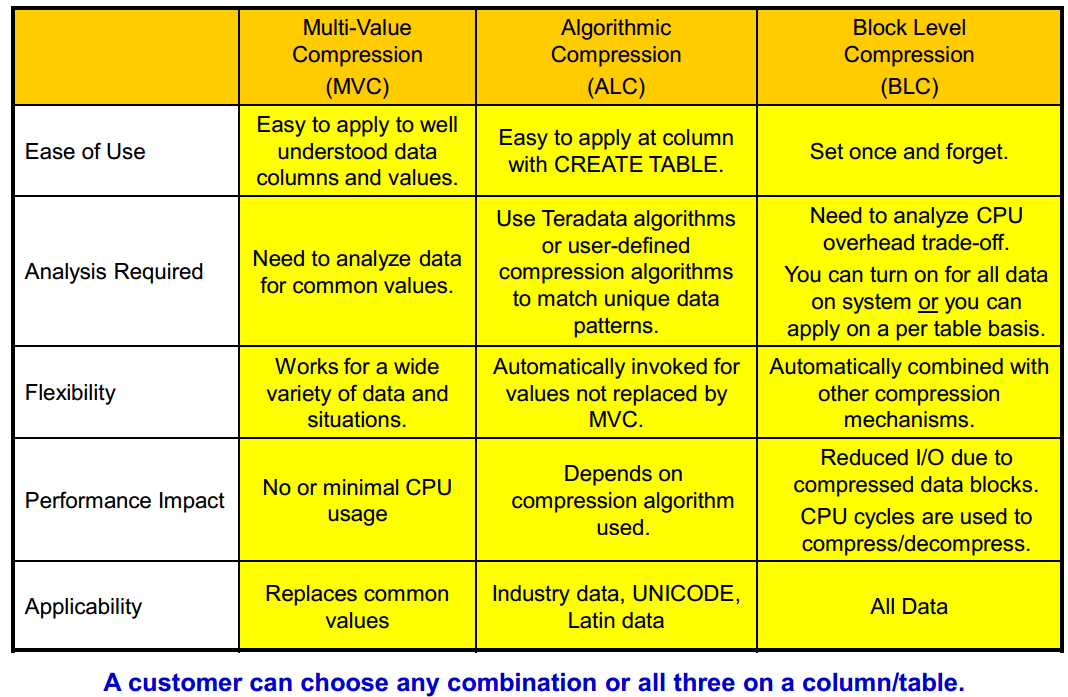
多值压缩(MVC)
Enhanced Multi-Value Compression (MVC) or Value-List Compression
• Compress VARCHAR, VARBYTE, or VARGRAPHIC columns
• Number of characters in a compressed value is increased to 510.
算法压缩(ALC)
Algorithmic Compression (ALC) or Column Level Compression
• Allows users to apply a compression algorithm to data at the column level in a row.
– One example is to compress two-byte Unicode into one byte when the data is Latin (ASCII).
• Compression/decompression is done by specifying a UDF function.
– Teradata provides some UDFs to do compression for UNICODE and LATIN data columns.
– User can create and apply their own compression/decompression algorithms to columns.
块压缩(BLC)
Block Level Compression :在数据块实际写入/读取存储设备之前,Teradata在文件系统级别对整个数据块执行压缩。
压缩/解压缩整个数据块会增加CPU成本,但会减少IO。目前CPU成本在不断下降,IO成本还比较高,所以CPU换IO非常划算。
可以在系统上打开所有数据块压缩,也可以按表申请块压缩。
自动与其它压缩机制结合。
BLC将只压缩/解压缩数据块,但不会用于任何文件系统结构,如主/柱面索引、WAL日志和表头。
• How is BLC set for a specific table?
• When loading data, SET QUERY_BAND = 'BLOCKCOMPRESSION=YES/NO;' FOR SESSION;
• Ferret utility has new commands – COMPRESS/UNCOMPRESS table
• DBSControl settings
1.在dbscontrol中开启块压缩
display compression
modify compression 1 = on
write
2.启动ferret
方法一:使用admin用户登录viewpoint,选择remote console,选择ferret工具
方法二:使用root用户登录节点
cnsterm 6
start ferret
日志提示started ferret in window 2
Ctrl + C 退出当前窗口

cnsterm 2  //2为start ferret命令显示窗口编号
3.记录ferret所有屏显日志
//启动ferret后执行
output into /tmp/file.out
4.查看某表是否已经压缩,C代表全压缩,U代表无压缩
scope table ("ds.orders" *)   //单表
scope table ("ds.orders" *,"ds.orders_2016" *)   //多表
showblock

tableid "ds.orders" //查看表ID
5.进行块压缩
同一时间仅能启动一个compress命令,/y参数代表无需确认。
compress  /y "ds.orders"      //压缩某张表
compress  /y "ds.*"   //压缩全库
6.解压缩
uncompress /y "ds.orders"
7.更新dbc的数据表大小信息
使用ferret工具进行压缩处理,dbc的空间信息不会及时更新,需要通过updatesapce工具进行处理,由于这个工具是针对整个库进行的,所以最好在一个库下面的所有表都压缩处理完成后,再统一执行一次。
如果某个表数据发生变更,也会自动更新DBC空间信息。
cnsterm 6
start updatespace
日志提示started update space in window 3
Ctrl + C 退出当前窗口

cnsterm 3  //3为start updatespace命令显示窗口编号
update all space for ds;