使用前面我们自定义的combo box下来列表技术可以预览每种字体的显示效果。
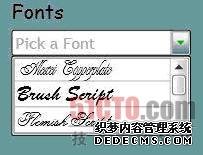
图4.字体下拉列表
更多关于自定义字体的信息,你可以参考Tim Heuer写的一篇文章http://www.devx.com/RIA/link/38145)。
设计参数存储和检索
自然地,你会想到任何一个项目都能在它们之前的版本上进行改进,因此,在我们的案例中,也添加了一项新功能,允许用户保存设计参数,并在以后随时进行检索和调阅,当然,保存这些内容的仓库就是SQL Server数据库了。
在设计数据库结构时,考虑到用户以后检索存储的设计信息要比较简单,我们只使用一个表来存储所有信息如产品颜色,水印颜色,字体等)。
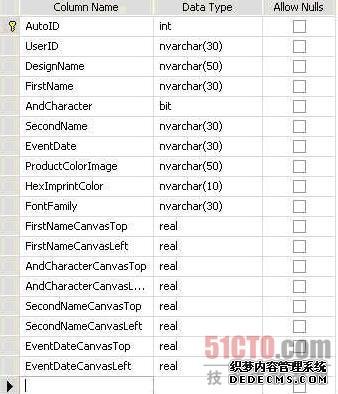
图5.存储设计参数的SQL Server表
弹出控制器Silverlight 2代码
<!-- Popup to display stored links -->
<Popup x:Name="popDisplayStoredLinks">
    <Grid x:Name="grdDisplayStoredLinks" Background="#007799aa">
        <Grid.RowDefinitions>
            <RowDefinition />
            <RowDefinition Height="Auto" />
            <RowDefinition />
        </Grid.RowDefinitions>
        <Grid.ColumnDefinitions>
            <ColumnDefinition />
            <ColumnDefinition Width="Auto" />
            <ColumnDefinition />
        </Grid.ColumnDefinitions>
        <Border BorderBrush="Black" BorderThickness="2" Background="WhiteSmoke"
CornerRadius="15" Grid.Column="1"
Grid.Row="1">
            <StackPanel
Margin="8" Width="330" >
                <StackPanel
Orientation="Vertical">
                    <TextBlock
Margin="5,5,0,5"
HorizontalAlignment="Center"
FontFamily="Comic Sans MS"
                               FontSize="22" >
Saved Designs for </TextBlock>
                    <TextBlock
x:Name="txbDisplayStoredLinksUserID"
Margin="0,0,5,5"
HorizontalAlignment="Center"
                               FontFamily="Comic Sans MS"
FontSize="22"
Text="UserIDHere" />
                </StackPanel>
                <ListBox x:Name="lstSavedDesigns" SelectionChanged
="lstSavedDesigns_SelectionChanged"
                         MouseLeftButtonUp="lstSavedDesigns_MouseLeftButtonUp"
Margin="10" />
                <Button
x:Name="btnPopCancelDisplayStoredLinks"
Click="btnPopCancelDisplayStoredLinks_Click"
                        Margin="5"
Content="Cancel" Width="100"
HorizontalAlignment="Center" VerticalAlignment="Bottom" />
            </StackPanel>
        </Border>
    </Grid>
</Popup>        }
//This popup window is triggered
by setting its IsOpen property to true

void webService_GetDesignsByUserIdCompleted(object
sender, CustomerDesignsServiceReference.GetDesigns
ByUserIdCompletedEventArgs e)
{
    if (_dbOperationsStatus[e.UserState.ToString()] ==
_dbOperationStatus.Canceling)
    {
        _dbOperationsStatus[e.UserState.ToString()] =
_dbOperationStatus.Canceled;
    }
    else
    {
        try
        {
            RetrievalCircleAnimation.Stop();
            brdWaitAnimationRetrieveStoredLinks.Opacity = 0;
            m_dtDatabaseRetrievalTimeout.Stop();
            //Check to see how many results have
been returned
            //If no results, display an error message
in the existing form
            if (e.Result.Length < 1)
            {
                _dbOperationsStatus[e.UserState.ToString()] =
                _dbOperationStatus.Selected;
                txbRetrieveStoredLinksResults.Text = "No artwork
                found for UserID "
               + txtRetrievalUserID.Text;
                btnRetrieveStoredLinksMaskClose.Content = "Close";
                return;
            }
            //If there is only one result, just display the
                                        saved design immediately
            else if (e.Result.Length == 1)
            {
                _dbOperationsStatus[e.UserState.ToString()] =
                _dbOperationStatus.Selected;
                RetrieveStoredLinksMask.Visibility = Visibility.Collapsed;
                popRetrieveStoredLinks.IsOpen = false;
                m_cdSavedDesigns = e.Result.ToList();
                DisplaySavedDesign(0);
            }
            else if (e.Result.Length > 1)
            {
                _dbOperationsStatus[e.UserState.ToString()] =
                _dbOperationStatus.Selected;
                //If there are multiple results, save each record to a
                CustomerDesign object and put a link in the
                Display Stored Links popup
                RetrieveStoredLinksMask.Visibility = Visibility.Collapsed;
                m_cdSavedDesigns = e.Result.ToList();
                lstSavedDesigns.ItemsSource = m_cdSavedDesigns;
                lstSavedDesigns.DisplayMemberPath = "DesignName";
                popRetrieveStoredLinks.IsOpen = false;
                popDisplayStoredLinks.VerticalOffset =
                (MainImageViewer.ActualHeight / 2)
                - (174 / 2) + HeaderImage.ActualHeight - 25;
                popDisplayStoredLinks.HorizontalOffset =
                (HeaderImage.ActualWidth / 2)
                - (350 / 2);
                popDisplayStoredLinks.IsOpen = true;
                txbDisplayStoredLinksUserID.Text = e.Result[0].UserID.ToString();
            }
        }
        catch (System.Exception ex)
        {
            _dbOperationsStatus[e.UserState.ToString()] = _dbOperationStatus.Failed;
            txbRetrieveStoredLinksResults.Text = "An Error occurred while
            retrieving your artwork. Please try again.";
            btnRetrieveStoredLinksMaskClose.Content = "Close";
            btnRetrieveStoredLinksMaskClose.Focus();
            Console.WriteLine(ex.Message);
        }
    }
|
本站文章为和通数据库网友分享或者投稿,欢迎任何形式的转载,但请务必注明出处.
同时文章内容如有侵犯了您的权益,请联系QQ:970679559,我们会在尽快处理。