●还原多个数据库的存储过程代码(一个目录下)
当一个目录下,存放这很多个备份文件的时候,我们需要还原整个目录,或者部分数据库备份文件,这时我们另外一个存储过程能实现这样的操作。这里我写一个存储过程sp_RestoreDataBase2:
- if object_id('sp_restoredatabase2') Is Not Null
- Drop proc sp_restoredatabase2
- Go
- create proc sp_restoredatabase2
- (
- @Path_bak nvarchar(1024),
- @Path_new nvarchar(1024)=null,
- @DataBaseList nvarchar(max)=null
- )
- As
- /*
- @DataBaseList 数据库列表,可留空,或数据库之间使用回车、空格、逗号分隔都ok
- */
- Set Nocount On
- Declare @subdirectory nvarchar(1024),@ErrorMsg nvarchar(1024),@flag smallint
- if isnull(@Path_new,'')=''
- exec master.dbo.xp_instance_regread N'HKEY_LOCAL_MACHINE', N'Software\Microsoft\MSSQLServer\MSSQLServer', N'DefaultData', @Path_new Output
- If Not Exists(Select 1 From master.sys.procedures Where name='sp_RestoreDataBase')
- Begin
- Raiserror 50001 N'找不到存储过程 sp_RestoreDataBase '
- Goto ExitFLag
- End
- Declare @Dir Table(subdirectory nvarchar(1024),depth int,[file] int)
- Declare @DBList table (DatabaseName nvarchar(128))
- Declare @DBListNull table (DatabaseName nvarchar(128))
- /*
- --SQL Server 2005
- Declare @BakHeaderTMP Table(BackupName nvarchar(128),BackupDescription nvarchar(255),BackupType smallint,ExpirationDate datetime,Compressed tinyint,Position smallint,DeviceType tinyint,UserName nvarchar(128),ServerName nvarchar(128),DatabaseName nvarchar(128),DatabaseVersion int,DatabaseCreationDate datetime,BackupSize numeric(20,0),FirstLSN numeric(25,0),LastLSN numeric(25,0),CheckpointLSN numeric(25,0),DatabaseBackupLSN numeric(25,0),BackupStartDate datetime,BackupFinishDate datetime,SortOrder smallint,CodePage smallint,UnicodeLocaleId int,UnicodeComparisonStyle int,CompatibilityLevel tinyint,SoftwareVendorId int,SoftwareVersionMajor int,SoftwareVersionMinor int,SoftwareVersionBuild int,MachineName nvarchar(128),Flags int,BindingID uniqueidentifier,RecoveryForkID uniqueidentifier,Collation nvarchar(128),FamilyGUID uniqueidentifier,HasBulkLoggedData bit,IsSnapshot bit,IsReadOnly bit,IsSingleUser bit,HasBackupChecksums bit,IsDamaged bit,BeginsLogChain bit,HasIncompleteMetaData bit,IsForceOffline bit,IsCopyOnly bit,FirstRecoveryForkID uniqueidentifier,ForkPointLSN numeric(25,0) NULL,RecoveryModel nvarchar(60),DifferentialBaseLSN numeric(25,0) NULL,DifferentialBaseGUID uniqueidentifier,BackupTypeDescription nvarchar(60),BackupSetGUID uniqueidentifier NULL)
- */
- --SQL Server 2008
- Declare @BakHeaderTMP Table(BackupName nvarchar(128),BackupDescription nvarchar(255),BackupType smallint,ExpirationDate datetime,Compressed tinyint,Position smallint,DeviceType tinyint,UserName nvarchar(128),ServerName nvarchar(128),DatabaseName nvarchar(128),DatabaseVersion int,DatabaseCreationDate datetime,BackupSize numeric(20,0),FirstLSN numeric(25,0),LastLSN numeric(25,0),CheckpointLSN numeric(25,0),DatabaseBackupLSN numeric(25,0),BackupStartDate datetime,BackupFinishDate datetime,SortOrder smallint,CodePage smallint,UnicodeLocaleId int,UnicodeComparisonStyle int,CompatibilityLevel tinyint,SoftwareVendorId int,SoftwareVersionMajor int,SoftwareVersionMinor int,SoftwareVersionBuild int,MachineName nvarchar(128),Flags int,BindingID uniqueidentifier,RecoveryForkID uniqueidentifier,Collation nvarchar(128),FamilyGUID uniqueidentifier,HasBulkLoggedData bit,IsSnapshot bit,IsReadOnly bit,IsSingleUser bit,HasBackupChecksums bit,IsDamaged bit,BeginsLogChain bit,HasIncompleteMetaData bit,IsForceOffline bit,IsCopyOnly bit,FirstRecoveryForkID uniqueidentifier,ForkPointLSN numeric(25,0) NULL,RecoveryModel nvarchar(60),DifferentialBaseLSN numeric(25,0) NULL,DifferentialBaseGUID uniqueidentifier,BackupTypeDescription nvarchar(60),BackupSetGUID uniqueidentifier NULL,CompressedBackupSize numeric(20,0))
- While charindex(char(13)+Char(10),@DataBaseList)>0
- Set @DataBaseList=Replace(@DataBaseList,char(13)+Char(10),',')
- While charindex(char(13),@DataBaseList)>0
- Set @DataBaseList=Replace(@DataBaseList,char(13),',')
- While charindex(char(9),@DataBaseList)>0
- Set @DataBaseList=Replace(@DataBaseList,char(9),',')
- While charindex(char(32),@DataBaseList)>0
- Set @DataBaseList=Replace(@DataBaseList,Char(32),',')
- Set @DataBaseList='Select '''+Replace(@DataBaseList,',',''' Union All Select ''')+''''
- Insert Into @DBList Exec(@DataBaseList)
- Delete @DBList Where DatabaseName =''
- Insert Into @Dir Exec xp_dirtree @Path_bak,1,1
- If Not Exists(Select subdirectory From @Dir Where Charindex('.bak',subdirectory)>0)
- Begin
- Set @ErrorMsg= N'无效的数据库路径: '+ rtrim(@Path_bak)
- Raiserror 50001 @ErrorMsg
- Goto ExitFlag
- End
- Declare cur_x cursor For Select subdirectory From @Dir Where Charindex('.bak',subdirectory)>0
- Open cur_x
- Fetch Next From cur_x Into @subdirectory
- While @@Fetch_status=0
- Begin
- Set @subdirectory=Case When Right(@Path_bak,1)='\' Then @Path_bak Else @Path_bak+'\' End+@subdirectory
- Delete From @BakHeaderTMP
- Insert Into @BakHeaderTMP
- Exec sp_executesql N'Restore HeaderOnly From Disk=@DatabBaseBakPath',N'@DatabBaseBakPath nvarchar(260)',@subdirectory
- IF @@ERROR <> 0
- Break
- Else if Exists(Select 1 From @BakHeaderTMP As a Where Exists(Select 1 From @DBList Where DatabaseName=a.DatabaseName) Or Not Exists(Select 1 From @DBList))
- Begin
- Exec @flag=sp_RestoreDataBase @subdirectory,@Path_new
- If @flag <>0 Break
- End
- Insert Into @DBListNull(DatabaseName)
- Select DatabaseName From @BakHeaderTMP
- Fetch Next From cur_x Into @subdirectory
- End
- CLose cur_x
- Deallocate cur_x
- If Exists(Select 1 From @DBList a Where Not Exists(Select 1 From @DBListNull Where DatabaseName=a.DatabaseName))
- Select DatabaseName As [无效的数据库] From @DBList a Where Not Exists(Select 1 From @DBListNull Where DatabaseName=a.DatabaseName)
- print replicate('=',60)
- Print N'@Path_new : '+@Path_new
- ExitFLag:
- Go
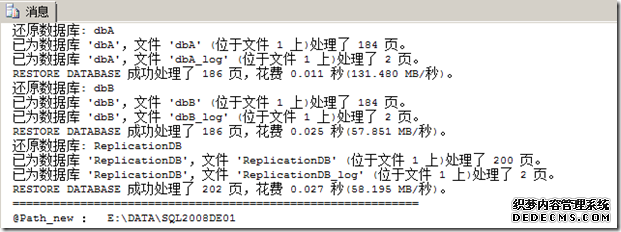
存储过程测试:
- use master
- Go
- Exec dbo.sp_RestoreDataBase2 'E:\DBBackup'
- go
小结
上面还原数据库的存储过程,它们给我们在工作中还原数据库的时候,带来许多便捷,如,不用我们一个个通过Microsoft SQL Server Management Studio(MSSMS)中的还原数据库向导去还原数据库,或也不用我们一个个执行”Restore Database”SQL语句去还原数据库。当然,在上面的代码中,我没有对每一个存储过程的每一个具体位置,进行解释。没有全部应用到”Restore Database”中”WITH”选项,我编写的主要目的是,存储过程参数尽可能的少,操作起来更方便,尽可能满足真实环境中的需要。如果你应用到以上的代码,可以根据自己所在的真实环境,进行修改补充。
本站文章为和通数据库网友分享或者投稿,欢迎任何形式的转载,但请务必注明出处.
同时文章内容如有侵犯了您的权益,请联系QQ:970679559,我们会在尽快处理。