缓存工厂之Redis缓存,工厂redis缓存
这几天没有按照计划分享技术博文,主要是去医院了,这里一想到在医院经历的种种,我真的有话要说;医院里的医务人员曾经被吹捧为美丽+和蔼+可亲的天使,在经受5天左右相互接触后不得不让感慨;遇见的有些人员在挂号队伍犹如长龙的时候坐在收费窗口玩手机,理由是自己是换班的差几分钟才上班呢;遇见态度极其恶劣的主任医师,做咨询几个问题声音马上提高并言语中携带讽刺话语;还有其他几个遇见哈哈这里就不多说了,可能是某些医务人员觉得多您个不少,我有的是客源,所以个别是这种态度吧,还是市医院真不知道怎么混进去的。
以上是个人的看法,下面来正式分享今天的文章吧:
。搭建Redis服务端,并用客户端连接
。封装缓存父类,定义Get,Set等常用方法
。定义RedisCache缓存类,执行Redis的Get,Set方法
。构造出缓存工厂调用方法
下面一步一个脚印的来分享:
。搭建Redis服务端,并用客户端连接
首先,咋们去这个地址下载安装文件https://github.com/dmajkic/redis/downloads,我这里的版本是:redis-2.4.5-win32-win64里面有32位和64位的执行文件,我这里服务器是64位的下面给出截图和用到部分程序的说明:
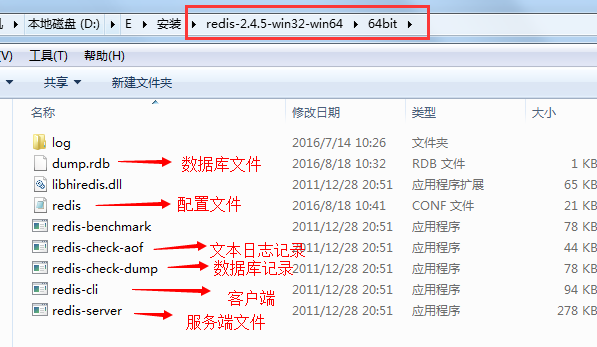
现在,咋们直接可以用鼠标双击redis-server.exe这个应用程序,这样就打开了redis服务窗体(您也可以下载一个windows服务承载器,把redis服务运行在windows的服务中,就不用担心每次关闭redis服务黑色窗体后无法访问redis了),运行起来是这样:
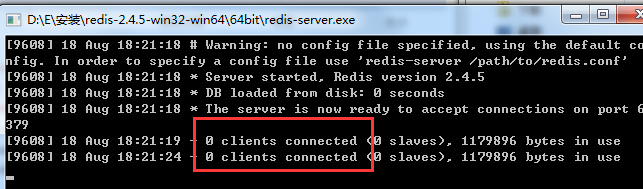
有红色框的信息就表示成功了,这里redis服务监听的端口默认是6379,要修改端口或者更多的配置信息请找到redis.conf配置文件,具体配置信息介绍可以来这里http://www.shouce.ren/api/view/a/6231
再来,打开客户端连接服务端,咋们退到64bit文件夹的目录中,鼠标移到64bit文件夹上并且安装Shift键,同时点击鼠标的右键,选中"在此处打开命令窗口"这样快速进入到了该文件夹的cmd命令窗口中(当然不同的操作系统不同,这里演示的是windows的操作;还有其他进入的方式这里不做介绍,因为个人感觉这是最快的);然后,在命令窗口中录入redis-cli.exe -h localhost -p 6379回车来访问服务端,效果图:

再来看下服务端窗体截图:

没错这样客户端就连接上服务端了,可以简单在客户端执行下set,get命令:
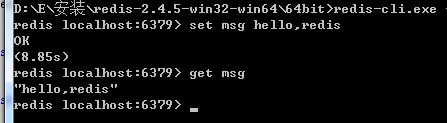
如果是客户端要访问远程的redis服务端,只需要把localhost换成可访问的ip就行了如果还需要密码等更多配置请去上面的那个地址链接;
。封装缓存父类,定义Get,Set等常用方法
先来,上父类的代码:

![]() 1 public class BaseCache : IDisposable
2 {
3 protected string
1 public class BaseCache : IDisposable
2 {
3 protected string def_ip =
string.Empty;
4 protected int def_port =
0;
5 protected string def_password =
string.Empty;
6
7 public BaseCache()
8 {
9
10 }
11
12 public virtual void InitCache(
string ip =
"",
int port =
0,
string password =
"")
13 {
14
15 }
16
17 public virtual bool SetCache<T>(
string key, T t,
int timeOutMinute =
10)
where T :
class,
new()
18 {
19
20 return false;
21 }
22
23 public virtual T GetCache<T>(
string key)
where T :
class,
new()
24 {
25
26 return default(T);
27 }
28
29 public virtual bool Remove(
string key)
30 {
31
32 return false;
33 }
34
35 public virtual bool FlushAll()
36 {
37
38 return false;
39 }
40
41 public virtual bool Any(
string key)
42 {
43
44 return false;
45 }
46
47 public virtual void Dispose(
bool isfalse)
48 {
49
50 if (isfalse)
51 {
52
53
54 }
55 }
56
57 //手动释放
58 public void Dispose()
59 {
60
61 this.Dispose(
true);
62 //不自动释放
63 GC.SuppressFinalize(
this);
64 }
65 }
View Code
这里定义的方法没有太多的注释,更多的意思我想看方法名称就明白了,这个父类主要实现了IDisposable,实现的Dispose()中主要用来释放资源并且自定义了一个 public virtual void Dispose(bool isfalse)方法,这里面有一句是GC.SuppressFinalize(this);按照官网介绍的意思是阻塞自动释放资源,其他的没有什么了,继续看下面的
。定义RedisCache缓存类,执行Redis的Get,Set方法
首先,咋们分别定义类RedisCache,MemcachedCache(这里暂未实现对memcache缓存的操作),并且继承BaseCache,重写Set,Get方法如下代码:
![]() 1 /// <summary>
2 /// Redis缓存
3 /// </summary>
4 public class RedisCache : BaseCache
5 {
6 public
1 /// <summary>
2 /// Redis缓存
3 /// </summary>
4 public class RedisCache : BaseCache
5 {
6 public RedisClient redis =
null;
7
8 public RedisCache()
9 {
10
11 //这里去读取默认配置文件数据
12 def_ip =
"172.0.0.1";
13 def_port =
6379;
14 def_password =
"";
15 }
16
17 #region Redis缓存
18
19 public override void InitCache(
string ip =
"",
int port =
0,
string password =
"")
20 {
21
22 if (redis ==
null)
23 {
24 ip =
string.IsNullOrEmpty(ip) ?
def_ip : ip;
25 port = port ==
0 ?
def_port : port;
26 password =
string.IsNullOrEmpty(password) ?
def_password : password;
27
28 redis =
new RedisClient(ip, port, password);
29 }
30 }
31
32 public override bool SetCache<T>(
string key, T t,
int timeOutMinute =
10)
33 {
34
35 var isfalse =
false;
36
37 try
38 {
39 if (
string.IsNullOrEmpty(key)) {
return isfalse; }
40
41 InitCache();
42 isfalse = redis.Set<T>
(key, t, TimeSpan.FromMinutes(timeOutMinute));
43 }
44 catch (Exception ex)
45 {
46 }
47 finally {
this.Dispose(); }
48 return isfalse;
49 }
50
51 public override T GetCache<T>(
string key)
52 {
53 var t =
default(T);
54 try
55 {
56 if (
string.IsNullOrEmpty(key)) {
return t; }
57
58 InitCache();
59 t = redis.Get<T>
(key);
60 }
61 catch (Exception ex)
62 {
63 }
64 finally {
this.Dispose(); }
65 return t;
66 }
67
68 public override bool Remove(
string key)
69 {
70 var isfalse =
false;
71 try
72 {
73 if (
string.IsNullOrEmpty(key)) {
return isfalse; }
74
75 InitCache();
76 isfalse =
redis.Remove(key);
77 }
78 catch (Exception ex)
79 {
80 }
81 finally {
this.Dispose(); }
82 return isfalse;
83 }
84
85 public override void Dispose(
bool isfalse)
86 {
87
88 if (isfalse && redis !=
null)
89 {
90
91 redis.Dispose();
92 redis =
null;
93 }
94 }
95
96 #endregion
97 }
98
99
100 /// <summary>
101 /// Memcached缓存
102 /// </summary>
103 public class MemcachedCache : BaseCache
104 {
105
106
107 }
View Code
这里,用到的RedisClient类是来自nuget包引用的,这里nuget包是:
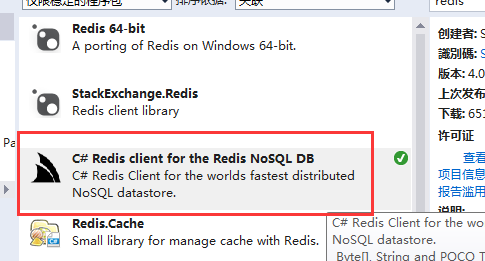
然后,来看下重写的InitCache方法,这里面有一些ip,port(端口),password(密码)参数,这里直接写入在cs文件中没有从配置文件读取,大家可以扩展下;这些参数通过RedisClient构造函数传递给底层Socket访问需要的信息,下面简单展示下RedisClient几个的构造函数:
1         public RedisClient();
2         public RedisClient(RedisEndpoint config);
3         public RedisClient(string host);
4         public RedisClient(Uri uri);
5         public RedisClient(string host, int port);
6         public RedisClient(string host, int port, string password = null, long db = 0);
至于Get,Set方法最终都是使用RedisClient对象访问的,个人觉得需要注意的是Set方法里面的过期时间参数,目前还没有试验这种情况的效果:
?通过这几种方法设置过期时间后,快到过期时间的时候如果此时有使用这个缓存key那么过期时间是否会往后自动增加过期时间有效期,这里暂时没有试验(这里是由于前面项目中的.net core框架中的memecache缓存都有这种设置,想来redis应该也有吧)
这里,需要重写下public override void Dispose(bool isfalse)方法,因为调用完RedisClient后需要释放,我们通过Dispose统一来手动释放,而不是直接在调用的时候使用using()
。构造出缓存工厂调用方法
接下来,咋们需要定义一个缓存工厂,因为上面刚才定义了一个RedisCache和MemcachedCache明显这里会有多个不同缓存的方法调用,所用咋们来定义个工厂模式来调用对应的缓存;这里的工厂模式没有使用直接显示创建new RedisCache(),new MemcachedCache()对象的方法,而是使用了反射的原理,创建对应的缓存对象;
先来,定义个枚举,枚举里面的声明的名字要和咋们缓存类的名称相同,代码如下:
1 public enum CacheType
2     {
3         RedisCache,
4
5         MemcachedCache
6     }
再来,定义个工厂来CacheRepository(缓存工厂),并且定义方法Current如下代码:
1 public static BaseCache Current(CacheType cacheType = CacheType.RedisCache)
2         {
3             var nspace = typeof(BaseCache);
4             var fullName = nspace.FullName;
5             var nowspace = fullName.Substring(0, fullName.LastIndexOf('.') + 1);
6
7             return Assembly.GetExecutingAssembly().CreateInstance(nowspace + cacheType.ToString(), true) as BaseCache;
8         }
*:通过传递枚举参数,来确定反射CreateInstance()方法需要用到的typeName参数,从而来定义需要访问的那个缓存对象,这里要注意的是加上了一个命名空间nowspace,因为缓存类可能和工厂类不是同一个命名空间,但是通常会和缓存基类是同命名空间所以在方法最开始的时候截取获取了缓存类需要的命名空间(这里看自身项目来定吧);
*:Assembly.GetExecutingAssembly()这个是用来获取当前应用程序集的路径,这里就避免了咋们使用Assembly.Load()方法还需要传递程序集的路径地址了
好了满上上面要求后,咋们可以在测试页面调用代码如:CacheRepository.Current(CacheType.RedisCache).SetCache<MoFlightSearchResponse>(keyData, value);就如此简单,咋们使用redis-cli.exe客户端来看下缓存起来的数据:
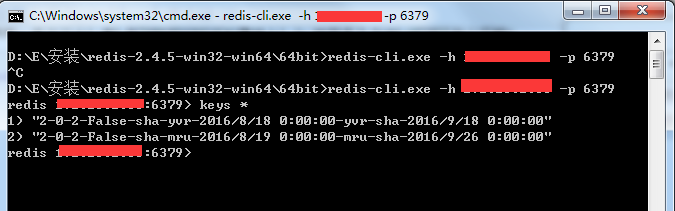
怎么样,您们的是什么效果呢,下面给出整体代码(最后更新时间:2016-09-29):
![]() 1 #region
1 #region CacheRepository 缓存工厂(默认存储Session中)
2
3 /// <summary>
4 /// 缓存枚举
5 /// </summary>
6 public enum CacheType
7 {
8 BaseCache,
9
10 RedisCache,
11
12 MemcachedCache
13 }
14
15 /// <summary>
16 /// 缓存工厂(默认存储Session中)
17 /// </summary>
18 public class CacheRepository
19 {
20
21 /// <summary>
22 /// 缓存工厂(默认存储Session中, CacheKey = "SeesionKey")
23 /// </summary>
24 /// <param name="cacheType">缓存类型</param>
25 /// <returns></returns>
26 public static BaseCache Current(CacheType cacheType =
CacheType.RedisCache)
27 {
28 var nspace =
typeof(BaseCache);
29 var fullName =
nspace.FullName;
30 var nowspace = fullName.Substring(
0, fullName.LastIndexOf(
'.') +
1);
31
32 return Assembly.GetExecutingAssembly().CreateInstance(nowspace + cacheType.ToString(),
true)
as BaseCache;
33 }
34 }
35
36 /// <summary>
37 /// 缓存基类(默认存储Session中)
38 /// </summary>
39 public class BaseCache : IDisposable
40 {
41 protected string def_ip =
string.Empty;
42 protected int def_port =
0;
43 protected string def_password =
string.Empty;
44 protected string CacheKey =
"SeesionKey";
45
46 public BaseCache()
47 {
48
49 }
50
51 /// <summary>
52 /// 获取自定义SessionId值
53 /// </summary>
54 /// <param name="key">key:使用唯一的登陆账号</param>
55 /// <returns>hash值的SessionId</returns>
56 public virtual string GetSessionId(
string key)
57 {
58 return Md5Extend.GetSidMd5Hash(key);
59 }
60
61 public virtual void InitCache(
bool isReadAndWriter =
true,
string ip =
"",
int port =
0,
string password =
"")
62 {
63
64 }
65
66 public virtual bool SetCache<T>(
string key, T t,
int timeOutMinute =
10,
bool isSerilize =
false)
where T :
class,
new()
67 {
68 var isfalse =
false;
69
70 try
71 {
72 key = key ??
CacheKey;
73 if (t ==
null) {
return isfalse; }
74
75 var session_json =
JsonConvert.SerializeObject(t);
76 HttpContext.Current.Session.Timeout =
timeOutMinute;
77 HttpContext.Current.Session.Add(key, session_json);
78 isfalse =
true;
79 }
80 catch (Exception ex)
81 {
82
83 throw new Exception(ex.Message);
84 }
85 return isfalse;
86 }
87
88 public virtual T GetCache<T>(
string key =
null,
bool isSerilize =
false)
where T :
class,
new()
89 {
90 var t =
default(T);
91
92 try
93 {
94
95 key = key ??
CacheKey;
96 var session =
HttpContext.Current.Session[key];
97 if (session ==
null) {
return t; }
98
99 t = JsonConvert.DeserializeObject<T>
(session.ToString());
100 }
101 catch (Exception ex)
102 {
103
104 throw new Exception(ex.Message);
105 }
106 return t;
107 }
108
109 public virtual bool Remove(
string key =
null)
110 {
111 var isfalse =
false;
112
113 try
114 {
115 key = key ??
CacheKey;
116 HttpContext.Current.Session.Remove(key);
117 isfalse =
true;
118 }
119 catch (Exception ex)
120 {
121
122 throw new Exception(ex.Message);
123 }
124 return isfalse;
125 }
126
127 /// <summary>
128 /// 增加缓存时间
129 /// </summary>
130 /// <returns></returns>
131 public virtual bool AddExpire(
string key,
int nTimeMinute =
10)
132 {
133 return true;
134 }
135
136 public virtual bool FlushAll()
137 {
138
139 return false;
140 }
141
142 public virtual bool Any(
string key)
143 {
144
145 return false;
146 }
147
148 public virtual bool SetHashCache<T>(
string hashId,
string key, T t,
int nTimeMinute =
10)
where T :
class,
new()
149 {
150
151 return false;
152 }
153
154 public virtual List<
string> GetHashKeys(
string hashId)
155 {
156
157 return null;
158 }
159
160 public virtual List<
string> GetHashValues(
string hashId)
161 {
162
163 return null;
164 }
165
166 public virtual T GetHashValue<T>(
string hashId,
string key)
where T :
class,
new()
167 {
168 var t =
default(T);
169 return t;
170 }
171
172 public virtual bool RemoveHashByKey(
string hashId,
string key)
173 {
174
175 return false;
176 }
177
178
179 public virtual void Dispose(
bool isfalse)
180 {
181
182 if (isfalse)
183 {
184
185
186 }
187 }
188
189 //手动释放
190 public void Dispose()
191 {
192
193 this.Dispose(
true);
194 //不自动释放
195 GC.SuppressFinalize(
this);
196 }
197 }
198
199 /// <summary>
200 /// Redis缓存
201 /// </summary>
202 public class RedisCache : BaseCache
203 {
204 public IRedisClient redis =
null;
205
206 public RedisCache()
207 {
208
209 //这里去读取默认配置文件数据
210 def_ip =
"127.0.0.1";
211 def_port =
6379;
212 def_password =
"";
213 }
214
215 #region Redis缓存
216
217 public static object _lockCache =
new object();
218 public override void InitCache(
bool isReadAndWriter =
true,
string ip =
"",
int port =
0,
string password =
"")
219 {
220
221 if (redis ==
null)
222 {
223 ip =
string.IsNullOrEmpty(ip) ?
def_ip : ip;
224 port = port ==
0 ?
def_port : port;
225 password =
string.IsNullOrEmpty(password) ?
def_password : password;
226
227 //单个redis服务
228 //redis = new RedisClient(ip, port, password);
229
230 //集群服务 如果密码,格式如:pwd@ip:port
231 var readAndWritePorts =
new List<
string> {
"shenniubuxing3@127.0.0.1:6379" };
232 var onlyReadPorts =
new List<
string>
{
233 "shenniubuxing3@127.0.0.1:6378",
234 "shenniubuxing3@127.0.0.1:6377"
235 };
236
237 var redisPool =
new PooledRedisClientManager(
238 readAndWritePorts,
239 onlyReadPorts,
240 new RedisClientManagerConfig
241 {
242 AutoStart =
true,
243 //最大读取链接
244 MaxReadPoolSize =
20,
245 //最大写入链接
246 MaxWritePoolSize =
10
247 })
248 {
249 //每个链接超时时间
250 ConnectTimeout =
20,
251 //连接池超时时间
252 PoolTimeout =
60
253 };
254
255 lock (_lockCache)
256 {
257 redis = isReadAndWriter ?
redisPool.GetClient() : redisPool.GetReadOnlyClient();
258 }
259 }
260 }
261
262 public override bool AddExpire(
string key,
int nTimeMinute =
10)
263 {
264 var isfalse =
false;
265 try
266 {
267 if (
string.IsNullOrEmpty(key)) {
return isfalse; }
268
269 InitCache();
270 //isfalse = redis.ExpireEntryIn(key, TimeSpan.FromMinutes(nTimeMinute));
271 isfalse =
redis.ExpireEntryAt(key, DateTime.Now.AddMinutes(nTimeMinute));
272 }
273 catch (Exception ex)
274 {
275 }
276 finally {
this.Dispose(); }
277 return isfalse;
278 }
279
280 public override bool SetCache<T>(
string key, T t,
int timeOutMinute =
10,
bool isSerilize =
false)
281 {
282
283 var isfalse =
false;
284
285 try
286 {
287 if (
string.IsNullOrEmpty(key)) {
return isfalse; }
288
289 InitCache();
290 if (isSerilize)
291 {
292 var data =
JsonConvert.SerializeObject(t);
293 var bb =
System.Text.Encoding.UTF8.GetBytes(data);
294 isfalse = redis.Set<
byte[]>
(key, bb, TimeSpan.FromMinutes(timeOutMinute));
295 }
296 else { isfalse = redis.Set<T>
(key, t, TimeSpan.FromMinutes(timeOutMinute)); }
297 }
298 catch (Exception ex)
299 {
300 }
301 finally {
this.Dispose(); }
302 return isfalse;
303 }
304
305
306 public override T GetCache<T>(
string key,
bool isSerilize =
false)
307 {
308 var t =
default(T);
309 try
310 {
311 if (
string.IsNullOrEmpty(key)) {
return t; }
312
313 InitCache(
false);
314 if (isSerilize)
315 {
316
317 var bb = redis.Get<
byte[]>
(key);
318 if (bb.Length <=
0) {
return t; }
319 var data =
System.Text.Encoding.UTF8.GetString(bb);
320 t = JsonConvert.DeserializeObject<T>
(data);
321 }
322 else { t = redis.Get<T>
(key); }
323 }
324 catch (Exception ex)
325 {
326 }
327 finally {
this.Dispose(); }
328 return t;
329 }
330
331 public override bool Remove(
string key)
332 {
333 var isfalse =
false;
334 try
335 {
336 if (
string.IsNullOrEmpty(key)) {
return isfalse; }
337
338 InitCache();
339 isfalse =
redis.Remove(key);
340 }
341 catch (Exception ex)
342 {
343 }
344 finally {
this.Dispose(); }
345 return isfalse;
346 }
347
348 public override bool SetHashCache<T>(
string hashId,
string key, T t,
int nTimeMinute =
10)
349 {
350
351 var isfalse =
false;
352
353 try
354 {
355 if (
string.IsNullOrEmpty(hashId) ||
string.IsNullOrEmpty(key) || t ==
null) {
return isfalse; }
356
357 InitCache();
358
359 var result =
JsonConvert.SerializeObject(t);
360 if (
string.IsNullOrEmpty(result)) {
return isfalse; }
361 isfalse =
redis.SetEntryInHash(hashId, key, result);
362 if (isfalse) { AddExpire(key, nTimeMinute); }
363 }
364 catch (Exception ex)
365 {
366 }
367 finally {
this.Dispose(); }
368 return isfalse;
369 }
370
371 public override List<
string> GetHashKeys(
string hashId)
372 {
373 var hashKeys =
new List<
string>
();
374 try
375 {
376 if (
string.IsNullOrEmpty(hashId)) {
return hashKeys; }
377
378 InitCache();
379 hashKeys =
redis.GetHashKeys(hashId);
380
381 }
382 catch (Exception ex)
383 {
384 }
385 finally {
this.Dispose(); }
386 return hashKeys;
387 }
388
389 public override List<
string> GetHashValues(
string hashId)
390 {
391 var hashValues =
new List<
string>
();
392 try
393 {
394 if (
string.IsNullOrEmpty(hashId)) {
return hashValues; }
395
396 InitCache();
397 hashValues =
redis.GetHashValues(hashId);
398 }
399 catch (Exception ex)
400 {
401 }
402 finally {
this.Dispose(); }
403 return hashValues;
404 }
405
406 public override T GetHashValue<T>(
string hashId,
string key)
407 {
408 var t =
default(T);
409 try
410 {
411 if (
string.IsNullOrEmpty(hashId) ||
string.IsNullOrEmpty(key)) {
return t; }
412
413 InitCache();
414 var result =
redis.GetValueFromHash(hashId, key);
415 if (
string.IsNullOrEmpty(result)) {
return t; }
416
417 t = JsonConvert.DeserializeObject<T>
(result);
418 }
419 catch (Exception ex)
420 {
421 }
422 finally {
this.Dispose(); }
423 return t;
424 }
425
426 public override bool RemoveHashByKey(
string hashId,
string key)
427 {
428 var isfalse =
false;
429
430 try
431 {
432 if (
string.IsNullOrEmpty(hashId) ||
string.IsNullOrEmpty(key)) {
return isfalse; }
433
434 InitCache();
435 isfalse =
redis.RemoveEntryFromHash(hashId, key);
436 }
437 catch (Exception ex)
438 {
439 }
440 finally {
this.Dispose(); }
441 return isfalse;
442 }
443
444 public override void Dispose(
bool isfalse)
445 {
446
447 if (isfalse && redis !=
null)
448 {
449
450 redis.Dispose();
451 redis =
null;
452 }
453 }
454
455 #endregion
456 }
457
458 /// <summary>
459 /// Memcached缓存
460 /// </summary>
461 public class MemcachedCache : BaseCache
462 {
463
464
465 }
466
467 #endregion
View Code
这次分享的Redis缓存从搭建到使用希望给您们有帮助,还请多多支持点赞,谢谢。
.2016-08-30号修改最新版本代码
http://www.htsjk.com/redis/10495.html
www.htsjk.Com
true
http://www.htsjk.com/redis/10495.html
NewsArticle
缓存工厂之Redis缓存,工厂redis缓存 这几天没有按照计划分享技术博文,主要是去医院了,这里一想到在医院经历的种种,我真的有话要说;医院里的医务人员曾经被吹捧为美丽+和蔼...
本站文章为和通数据库网友分享或者投稿,欢迎任何形式的转载,但请务必注明出处.
同时文章内容如有侵犯了您的权益,请联系QQ:970679559,我们会在尽快处理。