四、MongoDB客户端访问 – C#
接下来我们要开始最简单的MongoDB连接,访问数据之旅了。MongoDB提供各种主流与非主流语言的开发驱动,以便适应各个方向的开发人员。
1、下载驱动
C#驱动的下载地址为:
https://github.com/downloads/mongodb/mongo-csharp-driver/CSharpDriver-1.0.0.4098.zip
将其解压到D:\mongodb\drivers\目录下,其中有2个重要的dll文件
MongoDB.Bson.dll --序列化、Json相关
MongoDB.Driver.dll --驱动
2、添加引用
新建一个C#的项目,添加引用,将上面两个dll文件引入到项目里面:
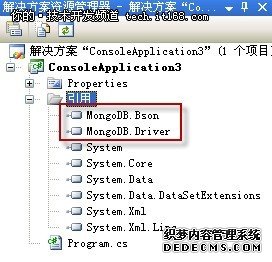
3、代码解析
下面以一个插入的操作为例,来一步一步解释代码:
- using System;
- using System.Collections.Generic;
- using System.Linq;
- using System.Text;
- //添加命名空间
- using MongoDB.Bson;
- using MongoDB.Driver;
- namespace ConsoleApplication3
- {
- class Program
- {
- static void Main(string[] args)
- {
- //MongoDB服务器连接串
- string connectionString = "mongodb://192.168.1.103";
- MongoServer server = MongoServer.Create(connectionString);
- //连接到 mongodb_c_demo 数据库
- MongoDatabase db = server.GetDatabase("mongodb_c_demo");
- //获取集合 fruit
- MongoCollection collection = db.GetCollection("fruit");
- //创建对象 fruit_1
- BsonDocument fruit_1 = new BsonDocument
- {
- { "name", "apple" },
- { "color", "red" }
- };
- //创建对象 fruit_2
- BsonDocument fruit_2 = new BsonDocument
- {
- { "name", "banana" },
- { "color", "yellow" }
- };
- //将对象 fruit_1 放到集合 fruit 中
- collection.Insert(fruit_1);
- //将对象 fruit_2 放到集合 fruit 中
- collection.Insert(fruit_2);
- //以上代码完成的就是向fruit表中插入2条数据,用mysql的语法解释即
- //insert into mongodb_c_demo.fruit (name, color)
- //values ('apple', 'red'), ('banana', 'yellow');
- }
- }
- }
4、通过MongoDB Shell来验证是否插入:
- > use mongodb_c_demo
- switched to db mongodb_c_demo
- > db.fruit.find();
- { "_id" : ObjectId("4da1c5fdfad96211a08f5752"), "name" : "apple", "color" : "red" }
- { "_id" : ObjectId("4da1c5fdfad96211a08f5753"), "name" : "banana", "color" : "yellow" }
- >
本站文章为和通数据库网友分享或者投稿,欢迎任何形式的转载,但请务必注明出处.
同时文章内容如有侵犯了您的权益,请联系QQ:970679559,我们会在尽快处理。